
Kindle Bluetooth page turners
HanLinYue Free3 on Kindle: a Bluetooth alternative to Kindle Click
New Free3 firmware lists direct Kindle page turning. Check the Kindle generation, both firmware versions and the conflicting Amazon listing before buying.
By WannabeShepherd ·
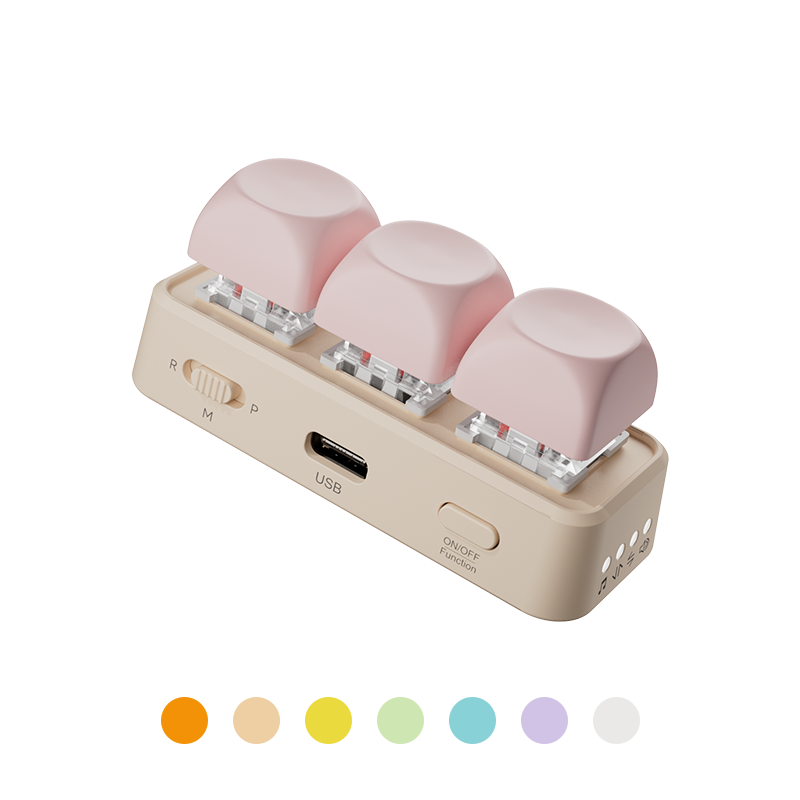
Two devices, two firmware checks
HanLinYue now documents Free3 firmware with direct Kindle support: a Kindle released in 2024–2026 running version 5.20.1, plus the appropriate update on the Free3 itself. This is worth checking if you already own the remote. If buying one, account for the update first: the Amazon listing still says it does not support Kindle.
Manufacturer-based compatibility guide checked 29 October 2026. I have not tested Free3.
As an Amazon Associate I earn from qualifying purchases.
| Free3 firmware | Dated release | Kindle mode | Documented controls |
|---|---|---|---|
| 18B2LJ · reader firmware | 23 October 2026 | M position; R is Android readers and P is Kobo | Next page, previous page, sleep |
| 5A0FLJ · multi-device firmware | 22 October 2026 | R position with up/down mode | Native Kindle page turning, light control and sleep |
The screen clip is no longer the only third-party route
The Reddit post that prompted this guide shows a Free3 being used as a Kindle remote. The useful development is that HanLinYue has published matching support in its firmware downloads. This is direct Bluetooth control, rather than a remote triggering a clip that touches the edge of the screen.
For reading with a Kindle on a stand, that removes one thing to attach to the reader. It also means the remote's software matters. A listing that says Bluetooth or works with the Kindle app on an iPad is still not enough to establish support for a Kindle e-reader. The broader Kindle accessories guide separates those options.
Check the release year, not when you bought the Kindle
Amazon's own Kindle Click compatibility starts with 2024 releases. HanLinYue's stated Free3 range is also based on release year. An older Paperwhite bought during a 2024 sale does not become a 2024 model. Use Device Info and Amazon's identification guide to check the device you actually own.
The firmware number alone will not settle it either. Amazon's software table lists 5.20.1 for the 2022 Scribe as well, but that reader falls outside the stated release-year range. I would not buy a Free3 for it on the strength of that number. For an older reader, investigate a screen-touch clip with an explicit match for the device and case.
Why the R/M/P instructions can look contradictory
The switch position depends on which firmware branch is installed. The table above follows the current Free3 download page; do not combine it with the older generic manual's device assignments. Keep the file identifier with the instructions so you know which set you are following later.
The manufacturer also has separate download pages for Free2 and Free2 2026. They are different firmware choices. This article's Free3 instructions and Amazon link should not be used as a shopping or update guide for those models.
Can you update it without a Windows computer?
HanLinYue offers a Windows updater and a phone OTA procedure. Its macOS software supports customisation but does not directly flash firmware. The phone route is therefore relevant for a Mac user; Windows is not the only documented option.
For the phone method, use the manufacturer's exact-model file and follow its pairing sequence inside the OTA app. The guide addresses removing an existing phone pairing first. Check that you can use one of the documented update routes before ordering a remote whose installed firmware is unknown.
The Amazon listing still says “not Kindle”
The checked listing is HANLINYUE Free3 in Purple, ASIN B0GVN7XP9G. Its description still excludes Kindle, just as the manufacturer's general product page does. The dated firmware notes explicitly add Kindle support. That is a real mismatch to consider before checkout; the new firmware documentation does not prove which version a seller will ship.
If you already have a Free3, look into the update before replacing the hardware. If buying new, confirm the model, update support and seller's return terms. Compare the delivered total with Kindle Click, including shipping.
Free3 gives you a three-key remote with a firmware update to arrange. Kindle Click is Amazon's own accessory, with its stated Kindle compatibility. I would weigh that convenience against the delivered price, rather than choosing from an old price quoted in a comment.
One step closer to a Bluetooth button cover
In the Kindle case compatibility article, I hoped somebody would turn the Click-style connection into a rechargeable case with page-turn buttons. Free3 is a separate remote, so that particular wish is still open. But third-party hardware sending page turns directly is exactly the development I wanted to see.
There is also an open-source Android implementation that makes a phone behave as a Kindle Click remote. It is a separate project; I found no evidence connecting it to HanLinYue's firmware. A working third-party button cover is still something I would like to see.
Sources and further reading
This guide uses the following manufacturer references and primary sources.
- HanLinYue: Free3 firmware versions, Kindle requirements and switch modes
- HanLinYue: software support for Windows, macOS and mobile OTA
- HanLinYue: official mobile OTA update procedure
- HanLinYue: Free3 hardware and the older Kindle exclusion
- Amazon: Kindle Click release-year compatibility
- Amazon: Kindle software versions
- Reddit: the original Free3 report and discussion
- Open-Kindle-Click-Android: a separate community implementation
As an Amazon Associate I earn from qualifying purchases.