
Keyboard buying guide
Keychron K5 V2 vs K5 Max vs K5 Ultra 8K: which fits a Mac desk?
K5 V2, Max or Ultra 8K for Mac? Compare ISO layouts, Mac keycaps, shine-through keys, receiver support and Launcher setup with my tested V2.
By WannabeShepherd · · Updated
Start with the connection and layout you need
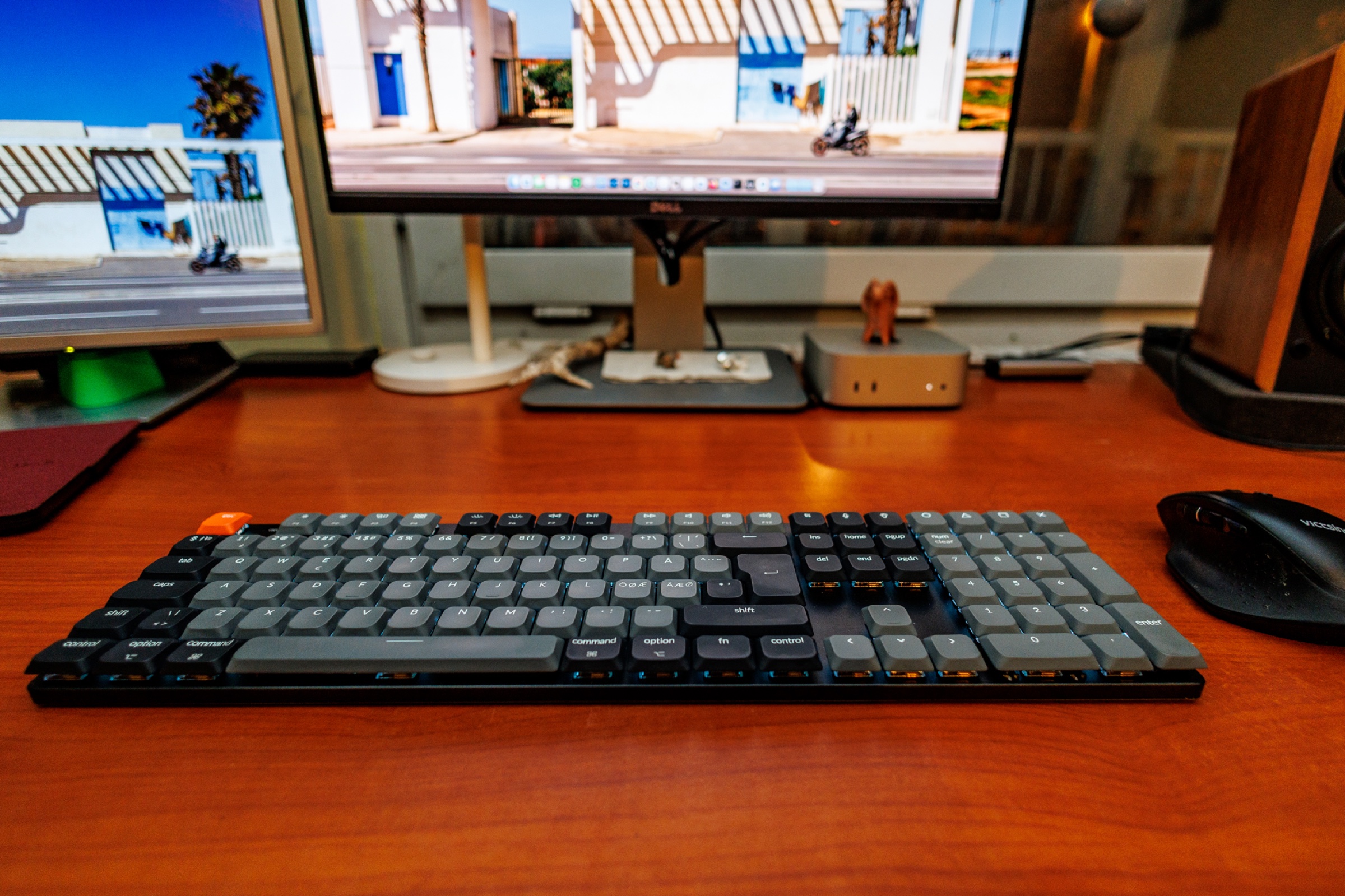
For a full-size Mac work keyboard, my K5 QMK Version 2 ISO was comfortable and its Bluetooth switching worked well. If a 2.4 GHz receiver and an ISO option both matter, research the K5 Max ISO. The K5 Ultra 8K adds different firmware, a knob and a published 8K mode, but I cannot recommend its feel or real-world speed from personal use.
Hands-on evidence: one week with a K5 QMK Version 2, ISO layout and Brown switches across a Mac mini, MacBook Pro, iPad and Windows PC. The K5 Max and K5 Ultra 8K were not tested; their features below come from Keychron's product pages checked on 6 October 2026. This is a buying guide, not a review of those models or a latency benchmark. K5 Max and K5 Ultra Launcher instructions were rechecked on 8 October 2026. Regional ISO options, included Mac/Windows keycaps and keycap materials were rechecked against Keychron’s pages on 9 October 2026.
As an Amazon Associate I earn from qualifying purchases.
| Decision point | K5 QMK V2 ISO | K5 Max ISO | K5 Ultra 8K |
|---|---|---|---|
| Evidence here | Used for one week | Manufacturer specifications only | Manufacturer specifications only |
| Connection | Bluetooth 5.2 or USB-C | 2.4 GHz, Bluetooth or USB-C | 2.4 GHz, Bluetooth or USB-C |
| Layout | My tested unit was ISO with Brown switches | Keychron lists UK, German, Swiss and Nordic ISO options | Check the exact sold layout; this guide does not establish an ISO version |
| Firmware | QMK / Keychron Launcher | QMK / Keychron Launcher | ZMK, according to Keychron |
| Keycap legends / material (manufacturer) | Shine-through ABS; regional ISO and Mac/Windows extras | Non-shine-through PBT; regional ISO and Mac/Windows extras | Non-shine-through PBT; confirm the exact sold layout |
| Wireless polling (manufacturer specs) | Bluetooth: 125 Hz; wired: 1,000 Hz | Bluetooth: 90 Hz; 2.4 GHz / wired: 1,000 Hz | Bluetooth: 125 Hz; 2.4 GHz / wired: 8,000 Hz |
| Advertised wireless battery life | Up to 160 hours with backlight off; 105 hours at lowest RGB brightness | Around 95 hours with backlight off; around 50 hours at lowest RGB brightness | Up to 370 hours in wireless 8K mode with backlight off |
| Gaming claim | No 2.4 GHz receiver; no latency test | 2.4 GHz receiver; no latency test | 8,000 Hz is a polling-rate claim, not a measured or user-visible speed result |
What the K5 V2 was like on my Mac
I liked the low-profile Brown switches as a first mechanical keyboard and used the numpad regularly at my desk. Bluetooth switching between the Mac mini, MacBook Pro, iPad and Windows PC was stable in my week of use. The browser-based Launcher was useful, although it missed some Mac apps inside subfolders and one remapped battery shortcut did not work in my setup.
The V2 has Bluetooth and USB-C, but no 2.4 GHz receiver. That was fine for my writing, photo work and casual play; it leaves less flexibility for a mixed work and gaming desk. Read the full K5 V2 ISO review for the test conditions and compromises.
K5 Max vs K5 Ultra: which should you shortlist?
Start with your required layout and connection. The Max ISO collection explicitly offers UK, German, Swiss and Nordic layouts, plus a receiver. If one of those layouts is essential, verify that requirement before comparing polling numbers.
The Ultra uses ZMK and adds a knob. Its 8K mode applies to wired and receiver connections; Bluetooth remains 125 Hz. For a Mac desk that stays on Bluetooth, 8K alone is not a reason to replace a working keyboard. I have not tested either model, so I cannot rank their feel or measured latency.
When the K5 Max ISO is the more relevant shortlist
Keychron lists 2.4 GHz, Bluetooth and wired connections for the K5 Max. Its ISO collection lists UK, German, Swiss and Nordic layouts. If you need a receiver for a Windows gaming PC and a specific ISO layout for Mac work, those are concrete reasons to compare the Max with the V2.
Keychron's current specification lists Bluetooth at 90 Hz and 2.4 GHz/wired at 1,000 Hz. It quotes around 95 hours with the backlight off, or around 50 hours with RGB at its lowest brightness. These are manufacturer estimates, not results from my use. Confirm the regional keycaps, switch choice and connection package on the actual listing.
What the K5 Ultra 8K changes on paper
The Ultra product page lists ZMK firmware, an integrated knob and 8,000 Hz polling in wired and 2.4 GHz modes. That specification is most relevant if you specifically want to investigate high polling and a different configuration system. It is not evidence of a perceptible speed improvement in my Mac workflow.
Keychron's product page lists Bluetooth at 125 Hz; its 8,000 Hz figure applies to wired and 2.4 GHz modes, not Bluetooth. It advertises up to 370 hours in wireless 8K mode with the backlight off. Keychron quotes different conditions for the V2 and Max, so these runtime figures are not a controlled comparison. I have not tested the Ultra's latency, battery life, switch feel, knob or Mac remapping, and I have not verified an ISO version for the Amazon results linked here.
Mac remapping: bring a cable, even for a wireless keyboard
Keychron’s K5 Max and K5 Ultra product pages both direct you to use a cable and a current Chrome, Opera or Edge browser for Keychron Launcher. Wireless typing support does not establish wireless configuration support. If you plan to customize Mac shortcuts, account for that setup step before choosing by connection mode alone.
The Ultra’s ZMK firmware does not mean it loses Launcher support: Keychron explicitly lists the web app for it. I have not tested Max or Ultra remapping; my hands-on Launcher observations apply only to the K5 V2 ISO. Use the model’s own instructions rather than flashing firmware or importing a configuration intended for a different K5.
ISO is a layout shape, not a language or a switch choice
Keychron lists UK, German, Swiss and Nordic ISO versions of both the K5 V2 and K5 Max, with extra Mac and Windows keycaps. Choose the region you actually type with; an ISO label alone does not mean Hungarian legends. Mac modifier caps also do not change the printed letter and symbol layout. Confirm the selected variant rather than relying on a generic product photograph.
The V2 ISO page lists shine-through ABS caps; the Max ISO page lists non-shine-through PBT caps. RGB backlighting and illuminated legends are different features. Also check Red, Brown or Banana switches separately: my Brown-switch experience does not describe every switch option. For a mixed Mac/Windows desk, confirm the included modifier caps and receiver package on the seller’s listing.
Check the listing before following the button
My K5 V2 photos and observations are from an ISO keyboard with Brown switches. The K5 V2 Amazon button now searches for that layout and switch combination instead of sending you to a different 104-key Banana-switch version. Amazon search results are not a verified exact listing and may still show other models, layouts or sellers. The K5 Max and Ultra buttons also open product searches.
Check the full model name, regional layout, switch, seller and return terms before buying. There are no fixed price or availability claims here. As an Amazon Associate I earn from qualifying purchases.
Sources and further reading
This guide uses the following manufacturer references and primary sources.
Common questions
Does the K5 Ultra run at 8,000 Hz over Bluetooth?
No. Keychron lists 8,000 Hz for wired and 2.4 GHz connections, and 125 Hz for Bluetooth.
Which K5 should I check if I need an ISO layout and a receiver?
Start with the K5 Max ISO collection. Keychron lists UK, German, Swiss and Nordic layouts with 2.4 GHz connectivity. Check the exact selected layout and seller listing before ordering.
Have all three keyboards been tested for this comparison?
No. The hands-on observations cover my K5 QMK Version 2 ISO with Brown switches. The Max and Ultra sections use manufacturer specifications, not personal tests.
Can I use Keychron Launcher with the K5 Ultra despite its ZMK firmware?
Yes, according to Keychron’s K5 Ultra product page. It instructs you to connect the keyboard by cable and use a current Chrome, Opera or Edge browser. The K5 Max page gives the same wired setup requirement. These are manufacturer instructions; I have not tested remapping on either model.
Do the K5 V2 and K5 Max ISO come with Mac and Windows keycaps?
Keychron says its UK, German, Swiss and Nordic ISO versions include extra keycaps for Mac and Windows. Verify the selected regional layout and seller package; those modifier caps do not turn one language layout into another.
As an Amazon Associate I earn from qualifying purchases.
The original review
Keychron K5 QMK Version 2 ISO
Full-size, low-profile K5 QMK V2 ISO with Brown switches tested for a week on Mac; stable Bluetooth, but no 2.4 GHz receiver.
Read review