
Photo import workflow
CFexpress reader for Mac: is USB4 worth buying over a 10Gb/s reader?
Compare ProGrade PG05.5 and PG05.6 for CFexpress Type B imports on Mac: SD support, USB4 ports, cables and the destination SSD.
By WannabeShepherd ·
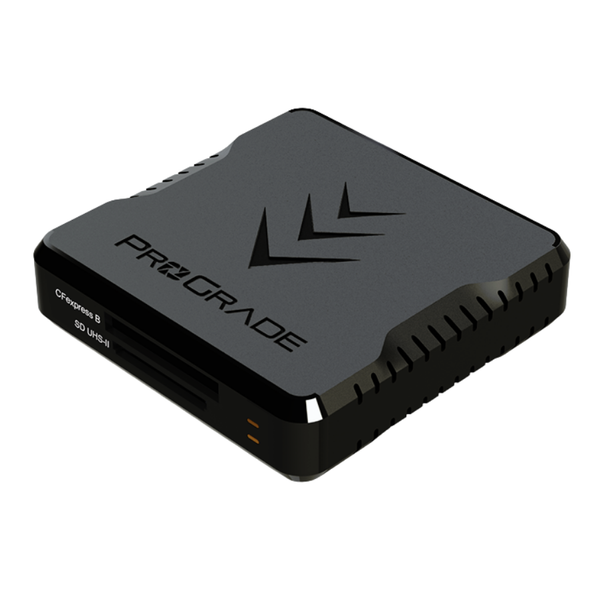
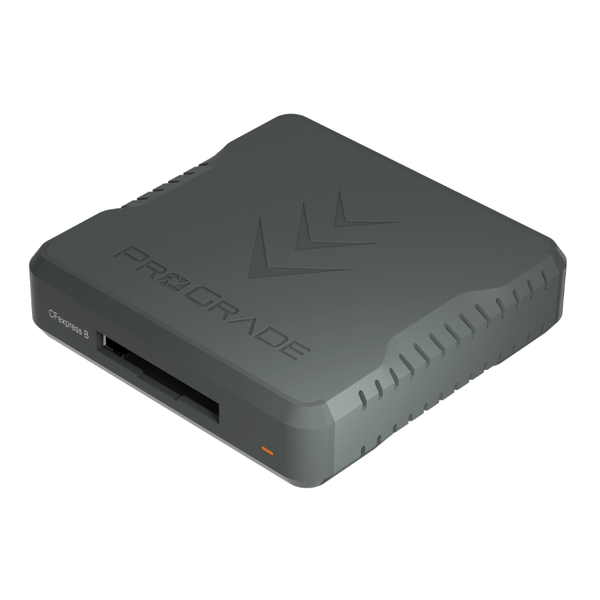
Buy USB4 for large CFexpress imports; keep a dual-slot reader for mixed cards
The PG05.5 reads both CFexpress Type B and UHS-II SD over a 10Gb/s connection. The PG05.6 offers a 40Gb/s USB4 interface for CFexpress Type B only. Choose around your import workload and Mac connection: the faster interface gives no benefit when another part of the copy path sets the limit.
Specification-based comparison, checked 12 October 2026. I have not benchmarked these readers. Interface ratings and illustrative copy calculations are not measured transfer speeds.
As an Amazon Associate I earn from qualifying purchases.
| Buying check | ProGrade PG05.5 | ProGrade PG05.6 |
|---|---|---|
| Card slots | CFexpress Type B + UHS-II SD | CFexpress Type B only |
| Host interface | USB 3.2 Gen 2, up to 10Gb/s | USB4, up to 40Gb/s |
| Included cables | 18-inch USB-C/C and USB-A/C | 0.8m certified USB4 cable |
| Choose for | One reader for mixed SD/CFexpress work | Large CFexpress imports with a suitable host and SSD |
| Trade-off | Lower interface ceiling | Separate SD reader may be needed |
Do you actually have a CFexpress bottleneck?
Before buying, time a normal import and note what it includes. Copying files, generating Lightroom previews and writing a second backup are different jobs. A faster reader can help the copy stage; it does not guarantee that every part of the import becomes faster.
For an SD-only kit, these CFexpress comparisons do not justify replacing a reader that already works. For an R6 Mark III kit, first match the card to the recording mode in the Canon memory-card guide. Choosing the correct card comes before choosing its reader.
PG05.5: SD and CFexpress in one device
The PG05.5 combines CFexpress Type B and UHS-II SD. ProGrade supplies both USB-C-to-C and USB-A-to-C cables, and lists a magnetic base with a mounting plate. It does not support XQD.
Its 10Gb/s rating is an interface ceiling, not a promised file-copy result. If you want one compact reader for both camera slots and do not regularly wait on hundreds of gigabytes of CFexpress footage, this is the more convenient of these two layouts.
PG05.6: faster connection, one card format
The PG05.6 is a single-slot CFexpress Type B reader with a USB4 interface rated up to 40Gb/s. ProGrade lists CFexpress 4.0 and 2.0 support, a heat sink and an included certified USB4 cable. It has no SD slot.
For a mixed-card workflow, count the cost and desk space of a separate SD reader. PG05.6 is worth comparing when large CFexpress imports are the part of your day you want to shorten—not merely because the number is higher.
On an M4 Mac mini, the socket matters
Apple lists the M4 Mac mini’s front USB-C ports at up to 10Gb/s; its rear Thunderbolt 4 ports support USB4 at up to 40Gb/s. A PG05.6 connected at the front cannot use a 40Gb/s host path there. M4 Pro also has faster rear ports; the reader’s own 40Gb/s rating remains its limit.
Connect the reader with its suitable data cable and check the host port, hub and destination drive. A USB-C socket or a charging cable alone does not establish data speed. For other Macs, use the specifications for your exact model rather than assuming every USB-C port is equivalent.
What could faster copying save?
For illustration, 200GB takes about 6 minutes 40 seconds at a sustained 500MB/s, or 1 minute 40 seconds at 2,000MB/s. That is a five-minute difference per copy. These are arithmetic examples using decimal units, not predictions for either reader. Small files, card speed, software and the destination can change the result.
Measure your present copy speed before paying for an upgrade. If the files go straight to a slower portable SSD, replacing the reader may leave that destination as the limit. Compare the storage path in the Samsung T9 versus T7 Shield guide and keep a second verified copy before erasing a card.
Check the exact Amazon listing
The linked models are PG05.5, ASIN B085PWGSMT, and PG05.6, ASIN B0CGY459R9; both titles were verified on Amazon. Do not substitute PG09.6: that similarly named reader takes Type A, not Type B. Confirm the selected model, seller, included cable and delivered price.
Compare the total you need: PG05.5 alone for both card types, or PG05.6 plus any SD reader you lack. A newer dual-slot USB4 model is a different product; this page compares these two specific readers rather than every option on the market.
Sources and further reading
This guide uses the following manufacturer references and primary sources.
Common questions
Does the PG05.6 read SD cards?
No. It is a single-slot CFexpress Type B reader. PG05.5 has both CFexpress Type B and UHS-II SD slots.
Will a 40Gb/s reader copy files at 5GB/s?
That conversion describes the interface rating, not a guaranteed file-copy speed. Card, cable, host, software and destination all matter.
Which M4 Mac mini port should I use for USB4?
Use a suitable rear port. Apple specifies the front USB-C ports at up to 10Gb/s; they cannot provide a 40Gb/s host connection.
As an Amazon Associate I earn from qualifying purchases.