
Color e-reader comparison · 4 October 2026
Choose the reader that fits your book library.
The new 2026 Kindle Colorsoft and Kobo Libra Colour both show color on a 7-inch E Ink screen. Kindle fits readers whose books and subscriptions already live with Amazon; Kobo brings page-turn buttons, native EPUB support and library borrowing in supported regions.
Paid Amazon links. As an Amazon Associate I earn from qualifying purchases.
Quick answer
Kindle Colorsoft vs Kobo Libra Colour: which should you buy?
Pick the Kindle Colorsoft if Kindle Store books, Kindle Unlimited or your existing Amazon library are the deciding factors. Pick the Kobo Libra Colour if you want physical page-turn buttons, native EPUB files, Kobo Stylus compatibility or direct OverDrive/Libby borrowing where your library supports it. Their color pixel density is the same on paper; the ecosystems and controls separate them.

The quick decision
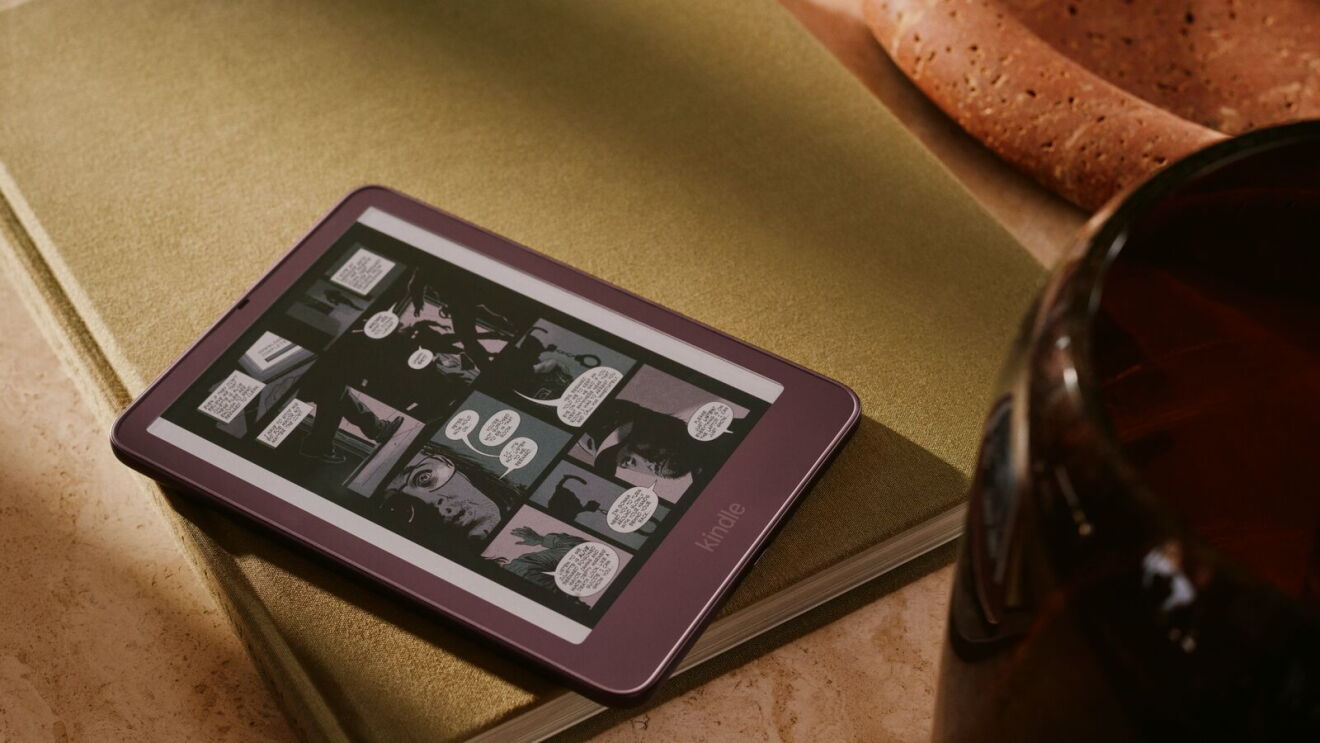
The 2026 Colorsoft is Amazon’s thinner, lighter refresh, with an edge-to-edge 7-inch color display. Kobo’s Libra Colour is an established 7-inch color reader with a hand-shaped grip and hardware page-turn buttons. If you are choosing a new device, start with where you buy and borrow books; both screens use the same 300-ppi black-and-white and 150-ppi color resolution, according to their published specs.
Neither spec sheet can tell you which screen looks better to your eyes. Color E Ink has a visibly different texture and brightness profile from a monochrome reader; try one in person if screen appearance is your main concern.
Specifications and U.S. prices
| Feature | Kindle Colorsoft (2026), 16GB | Kobo Libra Colour |
|---|---|---|
| U.S. price reference | $289.99 Amazon U.S. launch/list price | $259.99 on Kobo’s U.S. store when checked |
| Display | 7-inch color E Ink; 300 ppi black and white, 150 ppi color | 7-inch E Ink Kaleido 3; 300 ppi black and white, 150 ppi color |
| On-device storage | 16GB total; Amazon lists about 10.8GB available | 32GB total |
| Battery estimate | Up to 8 weeks under Amazon’s stated conditions | Up to 40 days under Kobo’s stated conditions |
| Water resistance | Waterproof, IPX8 | IPX8, up to 60 minutes in up to 2 metres |
| Physical page-turn buttons | No | Yes |
| Stylus | No stylus support on this model | Compatible with Kobo Stylus 2, sold separately |
| Library borrowing | Borrowing options depend on title, country and Kindle availability | OverDrive/Libby integration in supported countries and libraries |
The Colorsoft’s $289.99 figure is Amazon’s U.S. listed price for the 2026 16GB model. Kobo’s U.S. store showed $259.99 when checked on 3 October; retailer prices and delivery availability can change. The Kobo Stylus 2 is a separate purchase, listed at $69.99 by Kobo.
Books, stores and library borrowing
Kindle is easiest when you already use Amazon. Your Kindle purchases, Kindle Unlimited eligibility and Amazon account library stay in the same system. Amazon supports EPUB personal documents through Send to Kindle conversion; Kobo lists EPUB and EPUB3 among its formats supported natively. That difference matters if you regularly load books from other stores or manage your own files.
Kobo has a specific library-borrowing advantage. Libra Colour supports OverDrive and Libby integration, but Kobo says availability depends on country and the local library’s catalog. Check your library’s own e-book service before buying; support is not universal. Audiobook catalogs and features also vary by country.
For an Amazon-heavy library, the Colorsoft can be the simpler choice even if Kobo’s hardware suits your hand better. If most of your reading comes from library loans or DRM-free EPUB files, Kobo is the more natural starting point.
Controls and annotation
The Kobo Libra Colour has dedicated page-turn buttons and can pair with Kobo Stylus 2 for color highlights and handwriting. Kobo says the pen is sold separately. Those controls can be useful if you read one-handed, annotate frequently or use the device as a light notebook.
The new Kindle Click remote works with Kindle models released in 2024 or later, according to Amazon. It is a separate accessory and does not add physical buttons to the reader itself. If a built-in page-turn control is essential, Libra Colour has the more direct design.
Want the Amazon accessory fit details? See the 2026 Kindle accessories compatibility guide.
Color screens and battery claims
Both devices list the same nominal pixel density: 300 ppi for black-and-white content and 150 ppi for color. Kobo identifies its display as E Ink Kaleido 3; Amazon describes its new Colorsoft display architecture and edge-to-edge color. These specifications do not establish which display looks sharper or more saturated in person.
Battery estimates are not a head-to-head test. Amazon’s Colorsoft estimate assumes half an hour of reading per day, wireless off and the light at setting 13. Kobo’s 40-day estimate assumes half an hour per day, front light at 30%, and Wi-Fi and Bluetooth off. Your brightness, wireless use and content will affect either device’s result.
Which reader fits you?
- You already own a large Kindle library: start with the Colorsoft and keep your books, account and eligible subscriptions together.
- You borrow ebooks through Libby: check Kobo’s supported-country list and your library catalog; if both support your account, Libra Colour is the more direct fit.
- You want page-turn buttons built into the reader: Libra Colour.
- You annotate color passages or write in a reader: Libra Colour plus its separately sold Stylus 2.
- You send EPUB files often: Kobo reads EPUB/EPUB3 natively; Kindle converts supported personal documents through Send to Kindle.
- You mostly read plain novels: consider a black-and-white Kindle or Kobo instead. Color is a premium feature with little value if your books rarely use it.
For the rest of Amazon’s latest readers, see the full 2026 Kindle lineup guide, including the monochrome Paperwhite alternative.
Check the exact listings
Confirm the selected model, color, seller, delivery region and current price before checkout. The Kindle link is the 2026 Colorsoft 16GB listing; the Kobo Amazon listing is the Libra Colour 32GB device, not its stylus or cover.
Paid Amazon links. As an Amazon Associate I earn from qualifying purchases.